Check a Costco receipt
See if anything on a Costco receipt has gone on sale since you bought it. No sign-up.
or
Your receipt is read on this device and is not uploaded. Only the warehouse number, date and item numbers are sent to look up sales.
Copying your receipt in the Costco app
- Open the Costco app: Account, then Orders & Purchases, then Warehouse.
- Open a receipt from the last 30 days.
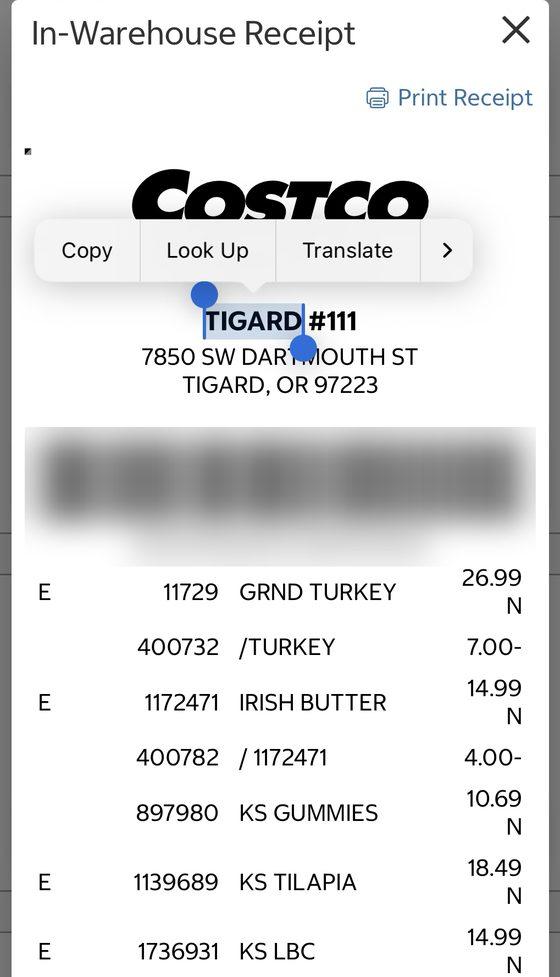
- Press and hold the store name at the top until it is highlighted.
- Drag the lower blue handle all the way to the bottom of the receipt, past “Items Sold”.
- Tap Copy. Come back here, tap the box above and paste.
On Android: share it straight here
Install this site once: open the browser menu and choose “Install app” or “Add to Home screen”. After that, share a receipt PDF from the Costco app or your Files app, pick Price Tracker in the share list, and the check opens with it. The receipt stays on your phone. iPhones do not offer this, so use the paste box there.
Or use the PDF: tap Print Receipt, then Share, then Save to Files, and choose it with “Choose the receipt PDF”. On a computer you can also drag the PDF onto the box.